Thursday, August 1, 2013
This blog has moved, you will be redirected shortly.
After months of thought, I have simplified! When you are redirected, you will find the post you were looking for by searching the topic. Thanks for your patience!

Sunday, July 7, 2013
My Confession to Kinderchat

First, I did use the word hate, and I
do not use it often. Second, I am a kindergarten teacher and
understand that my experiences with curriculum have only been at this
one level. Having said that, I feel I can continue.
I spent the first eight years of my
teaching career with boxed curriculums. What I discovered was that I
focused too much on the curriculum and not enough of the learner. I
focused on what I would teach each day rather than who I would be
working with each day. I planned my week in advance, not taking into
account the learners preferences, likes/dislikes, or level of
comprehension of a subject. The curriculum scripted how a child
should look at a problem or activity, providing specific directions
on what to do and how to do it. In those years, the learners all did
well, picking up on skills they needed to master. But they did not
LOVE a topic. They did not feel passionate about the activities. They
did not find an area that they would want to explore
outside of school.
This is where inquiry based learning
has come into play. I have slowly been restructuring the classroom
to an open environment of exploration and curiosity. A place where a
child can relate to a subject or topic how they see fit, or even
choose the topic on their own. This has been a long process, taking
years of adapting and learning, but it has been an amazing
transformation.
Thanks, Kinderchat, for letting my
confess. I know some folks do not appreciate my feelings on this
subject, but I cannot ignore the differences I have seen in the
classroom. I cannot wait to see what happens this year!
Integrating Technology In Math
I am again joining up with I Teach 1 to1 and posting about technology integration. This week's focus is how
we integrate technology into math. This is a great topic, as
technology assists the class in math exploration daily in our
classroom.

When I think about math, I do not think
about curriculum or textbooks, especially in kindergarten. We use
math to talk about what we see in the world and math also helps us
understand what we see. Rather than repeating patterns in a book, we
find patterns in the world and snap pictures of them with our iPads.
Rather than just counting images and writing numbers in a workbook, we
put together collections and edit them via Skitch, which allows us
to annotate our pictures. We can also record our thoughts on math
concepts to share on our blog or on Twitter. Technology supports the
inquiry and project-based classroom and promotes real-world
application of math concepts.

Our school has adopted Daily Five for
reading. In efforts to keep things simple and routine for my kinders,
I use the same format for small/independent groups in math. We
practice five main areas (geometry, measurement, numbers, graph and sort, money and time) just as we do in reading. The children can move through
activities in these five areas on their own as well as make up their
own project that promotes the understanding of these concepts. The
iPads have been a wonderful addition to this portion of our day. The
children have numbered folders corresponding to the five areas of
math. They can choose to work within these folders (which also
include IXL), if they like. They can also choose manipulatives,
games, or a project they have designed. Through all of this, we are
using our math vocabulary and solving real-world problems. Technology
has been a perfect addition to our math explorations as they promote
understanding and documenting of our learning. I meet with learners
individually or in small groups each day to talk about their learning
and assist as needed.
I look forward to gaining insight from
others this week. I hope to add more tools to our collection of
resources.
Monday, July 1, 2013
Technology and Reading
I am joining the iTeach 1:1, Tune IntoTechnology Linky Party over the next few months to share and learn
from others. I look forward to reading about the wonderful things
going on in other classrooms. This week's post is regarding the use
of technology in reading.
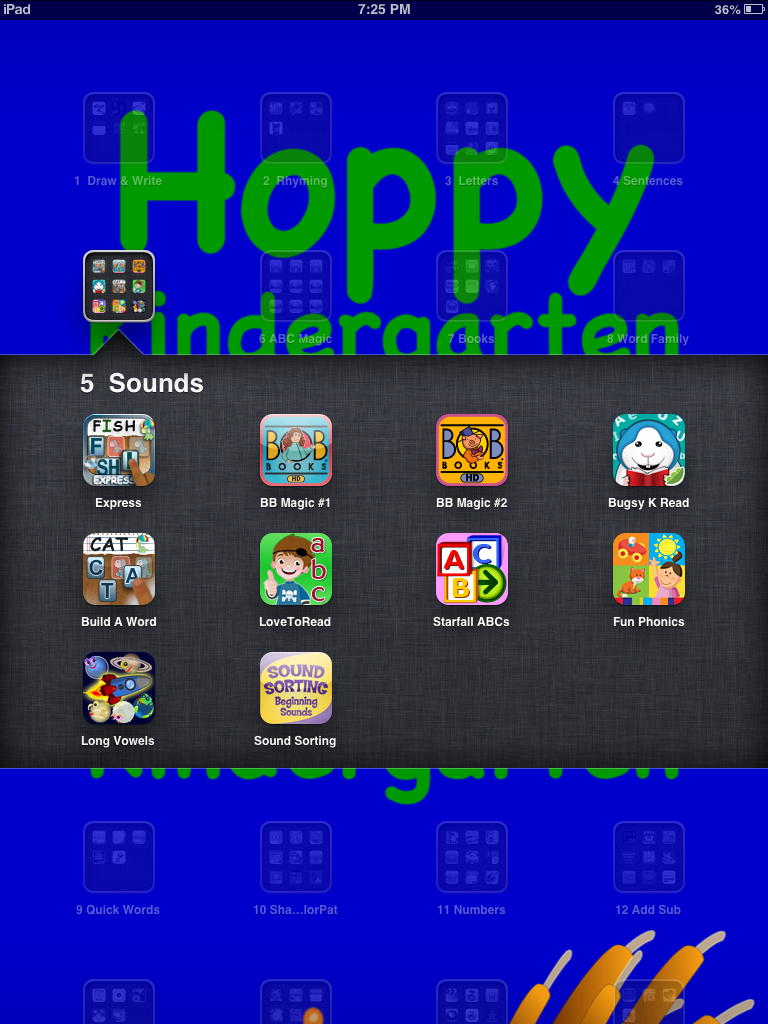
 I have folders numbered on their iPads
from one to eighteen, for easy reference in kindergarten. Each folder
also has a name. In the area of reading, there are folders labeled
for many different skills; letters, sounds, grammar, quick words,
etc. There are also folders for drawing, writing, creating ebooks, or
presentations. With this setup, learners can choose any application
within the folders to work on skills or create a project. We talk
about choices they can make when an application is too easy or too
hard, such as keep trying, ask a friend, or try something different.
I have folders numbered on their iPads
from one to eighteen, for easy reference in kindergarten. Each folder
also has a name. In the area of reading, there are folders labeled
for many different skills; letters, sounds, grammar, quick words,
etc. There are also folders for drawing, writing, creating ebooks, or
presentations. With this setup, learners can choose any application
within the folders to work on skills or create a project. We talk
about choices they can make when an application is too easy or too
hard, such as keep trying, ask a friend, or try something different.


In the specific area of listening to reading, we utilize some eBook applications such as MeeGenius, Storia, and TumbleBooks. I have also uploaded more than 100 books into our iTunes library from CD and the learners get quite good at finding the title of the book because they are in alphabetical order. I do not want to spend money on eBooks (at least not much) as there are so many free applications available in this area.
My goal is to help children learn and
grow in a way that empowers. I want the learners to have control of
their education and be able to make their own choices. This includes
whether a learner utilizes an iPad, paper/pencil, or an art medium to
demonstrate learning. This also includes the manner in which they
practice reading skills.
We all have different moods, good days
and bad days, and the right to push ourselves or take a day to relax.
I want the children to recognize these moods and choose how to handle
their feelings. If they are feeling a little tired or frustrated,
they have every right to choose an application or activity that
doesn't push them too hard. On the other hand, they can also take
opportunities to try and push themselves on a harder application when
they feel up to the challenge. I feel I am providing the children
with power and life skills when I help them understand their moods
and how their learning in the area of reading relates to their
feelings.
We utilize a daily five setup in the
classroom, as our school has adopted this management system. I
wanted to continue an open, learner-centered environment during this
time (as well as an inquiry-based system the rest of the day, but
that is another story). The children are allowed to make their own
choices within the daily five rotation (I do not assign their
activities). They will choose the area to work, the skill they want
to work on, and the tool that they want to utilize. They have the
power, and I am there to support them in their learning.
 I have folders numbered on their iPads
from one to eighteen, for easy reference in kindergarten. Each folder
also has a name. In the area of reading, there are folders labeled
for many different skills; letters, sounds, grammar, quick words,
etc. There are also folders for drawing, writing, creating ebooks, or
presentations. With this setup, learners can choose any application
within the folders to work on skills or create a project. We talk
about choices they can make when an application is too easy or too
hard, such as keep trying, ask a friend, or try something different.
I have folders numbered on their iPads
from one to eighteen, for easy reference in kindergarten. Each folder
also has a name. In the area of reading, there are folders labeled
for many different skills; letters, sounds, grammar, quick words,
etc. There are also folders for drawing, writing, creating ebooks, or
presentations. With this setup, learners can choose any application
within the folders to work on skills or create a project. We talk
about choices they can make when an application is too easy or too
hard, such as keep trying, ask a friend, or try something different.


In the specific area of listening to reading, we utilize some eBook applications such as MeeGenius, Storia, and TumbleBooks. I have also uploaded more than 100 books into our iTunes library from CD and the learners get quite good at finding the title of the book because they are in alphabetical order. I do not want to spend money on eBooks (at least not much) as there are so many free applications available in this area.
I look forward to seeing what others
have posted this week. Thanks to all that have shared!
Monday, June 3, 2013
What I Learned: A Year in Review
As I sat with my children the last week of school, I asked them to share things they had learned throughout the school year. Some children are very specific, pointing out small details that really stuck with them (caterpillars changing to butterflies, liquid changing to gas, animal characteristics). Others will share general statements about reading, math, social studies, or science. I had one child ask me what I had learned. Well, there is a lot I have learned. Teachers learn so much in one year both about themselves and how to be effective in the classroom. Here are a few things that I have learned this school year:

I am thankful for the learners in the classroom, their families, my PLN on Twitter, and those I work with at school who have all helped me learn this school year. Each year, my ability to be effective in the classroom improves. I look forward to learning a lot more next year!
- When teachers put their energy into building relationships rather than building management systems, the rewards are huge! When you can better understand a child, their learning style, their background, their likes/dislikes, and the reasons they do the things they do, the classroom environment improves.
- Teacher manuals do not make better teachers. Don't get me wrong, I love resources and ideas; the more ideas the better. However, if teachers only needed a manual you would not need a degree to be an educator. The ability to connect each student to the materials is something that cannot be found in a manual. We need to teach the learner and not the curriculum.
- Teachers need to be flexible. When the teachable moments arise, we need to take advantage. Sure, we were talking about addition, but the snow outside is too amazing not to discuss. These moments will create learning that sticks with the child. We need to tap into the natural curiosity of the learner.
- Inquiry-based learning is too underrated and underused. There are standards each learner must meet, however how they do this is open to interpretation. It is amazing how much a child will push themselves to learn when it is a something derived from their own questions.
- Scripting a child's education does not create a stronger learner. What good is knowing how to add or subtract with flashcards or in a workbook if they cannot transfer that learning into a real-life situation? Workbooks and worksheets script how a child should look at a skill, not opening their minds to understanding the skill in their own way.
- Class sizes matter. I have had classes of 25 as well as classes of 15. I have had time this school year to do all of the things I have listed above because of smaller class sizes. The children have reaped the rewards of this situation. With 25 learners, each day becomes about survival. Trying to meet the needs of every learner means I have to control the environment. This makes inquiry learning, building relationships, and giving the control of the classroom to the child much more difficult (possible, just very difficult). I will never take class sizes in the teens for granted, even though I feel it is every child's right.
- Social media is a wonderful thing! I have been able to connect with many more families (and extended families) this school year with social media. You need to have a plan for those who do not utilize these tools, however for those that do, there is an improved relationship between home and school.
- Sir Ken Robinson is a brilliant man with a lot of ideas. Standardized testing will not save our schools or our children, but there are plenty of things that will. Check out is TEDTalks for more information.
I am thankful for the learners in the classroom, their families, my PLN on Twitter, and those I work with at school who have all helped me learn this school year. Each year, my ability to be effective in the classroom improves. I look forward to learning a lot more next year!
Monday, March 11, 2013
For My Daughter, Son, and Students: A Mother and Educator's Plea in a Wounded Education System
Being a parent and an educator require
much of the same attributes; understanding, reliability, a sense of
humor, love. What makes me a good parent in turn makes me a good
educator. Don't get me wrong, I have made many mistakes that left me
with feelings of failure. Recently, as I listened to my daughter cry
and share that she felt stupid because she did not perform well on a
test, I felt like a failure. However, I share this failure with an
education system that is wounded.
We are wounded, but we are not broken.
Our education system is failing some children and yet succeeding with
others. There are schools that are seeing graduation rates soar while
others are declining. Many classrooms are sparking a love of learning
in their children that will stay with them for a lifetime, while
others are crushing this love of learning and leaving children
without a sense of self-worth. Yes, we are wounded, yet we are not
broken. The problems we have can be solved, and I know there are many
educators out there already getting started. I read about these
fabulous people everyday on Twitter and watch them rejuvenate
educators via TED Talks.
Children have access to a world's worth
of information right at their fingertips. We no longer live in a time
where the most efficient way to learn about history is to drive to
the nearest library and dive into a stack of books. We do not live in
a world where math problems are presented in story problem format and
we must remember specific steps for solving the equation. These
scripted moments of isolated practice do not prepare us for the
problems we encounter in life. Living life and solving the problems
we encounter will prepare our children for the future.
I hear many educators comment that many
children do not know how
to think. I agree, but that is not the fault of the child. We
as educators strip this ability from our children by pushing them
though a system that scripts how they should think. Regardless of
learning style, past experiences, interests, or abilities, we push
them forward. We give them every step in how to solve a math problem,
give them the answers in the back of a text book, and correct their
work based on a rubric. We tell them their solutions are wrong rather
than having them find the errors themselves and learn from their
mistake. We script a child's education, straining it of enthusiasm
and opportunities for creativity.
Imagine working in an environment where
there was only one judge of your job performance. One person who
dictated whether you are a success or a failure. One person who
labeled you with behavior charts, test scores, and leveled groups.
Our children meet this challenge head-on each day, yet many adults
tremble at the thought of one or two job evaluations a year. Some
children succeed in this environment, while others do not. Some
thrive in this environment while others are crushed. Educators often
ask why a child does not want to learn or 'behave' as they should.
Why would a child want to push forward when they feel deflated? Why
would they have a love of learning when it is not in their control? A
child cannot take control if the control they are given is only an
illusion.
I feel that the values and skills we
should be instilling in our children have nothing to do with a
textbook, test, curriculum, tool, or worksheet. If we truly want
children to know how to think and take control of their learning,
let's provide them with the opportunity. As educators, let's stop
being the road block that keeps appearing at the beginning and end of
each learning unit. Instead, let us be that fountain of enthusiasm
that cheers on each and every child from the sidelines. Let's help
our learners find their value. Let's follow the children's interests
and inquiries and provide them with real-life opportunities to grow.
They do not need to memorize facts for the sake of passing a test.
These facts will still be seconds away when they need or want to find
them.
If I had to choose three things that my
children would have at the conclusion of a school year, they would
have nothing to do with scores or standards. They would leave with
curiosity, confidence, and passion.
They would have a curiosity that drives
them to pick up their iPad and search a topic just because they want
to learn more. The learning that occurs in this situation will stay
with them unlike the learning in a study guide and test. Curiosity
that drives them to ask questions and solve problems. Curiosity that
urges them to dig in the dirt, swing as high as they can, or slide
backwards down a slide. This is what truly gives children a love of
learning. This requires teachers to realize that learning is not
always on schedule. If it is, the control is still in the hands of
the teacher.
Let's give children confidence in
themselves so they feel like they can succeed at any task as long as
they are given the time. Confidence that can stand up to a wounded
education system, bully, or complex problem like a warrior. We all
have moments of self-doubt. Helping a child realize their own inner
strength is how we help them overcome obstacles. As parents and
educators we cannot, nor should not, remove all conflict from a
child's life. What we can do is help them discover the value in
themselves that will strengthen their character and help them survive
a world that does not always show compassion and understanding.
We need to help children find a
passion. Something that makes them want to jump out of bed each day
and take on the world. Something that gives them a sense of purpose
and pride. The sort of thing that their parents brag about to other
parents repeatedly, whether it be music, sports, computers, books,
nature, animals, engineering, or volunteering. Anything that helps us
realize we are so much more than the person on the outside. We are a
construct of our emotions, actions, passions, and understandings.
Passion in life is the difference between surviving and living. We
cannot deny our children the chance to truly live.
Unfortunately, we see that textbooks
and tests do not instill curiosity. They do not leave all children
feeling confident in their abilities. They do not strike a passion in
a child that leaves them feeling like they just have to learn more.
They leave many children feeling like they are, as my daughter put
it, stupid. They affirm feelings of self-doubt that nag at a child's
soul until they dismiss learning as a value. They shut down
opportunities to discover passions and purposes in life that could
mean the difference between a child growing up to go to college and a
child being satisfied with a job that just pays the bills.
So, to my daughter and son, you are so
much more than a test or set of standards on a piece of paper. It is
okay to love playing with toys that are rated for three year old
children because they are fun. Be curious and ask questions, even if
others may laugh at your way of thinking. Use that same confidence to
show who you really are, even if it means you will wear cowboy boots
with sweatpants or a t-shirt full of glitter. And, find a passion
that makes you want to succeed in life and not just survive. Find
that thing that makes you tick. Scratch that, find the thing that
makes you explode with enthusiasm to a point you share and rattle on
until others are bored. You are not stupid. The system is wounded. So,
count on yourself and others around you that share your curiosity,
build your confidence, and support your passions.
Friday, February 15, 2013
Footsteps 2 Brilliance Giveaway!

Over the last few weeks, I have been trying out the Footsteps2Brilliance program on our iPads. This program includes the use of many different eBooks that are at appropriate guided reading levels for my learners as well as comprehension games and activities that the learner can complete on their own or with guidance.
We have utilized this program in our guided reading groups and it has been a great addition to our comprehension skills practice each day. The children enjoy the stories and the games, making this a fun addition to our curriculum. Some of the benefits that I have noticed as well as other teachers utilizing the program are:
- Increased use of vocabulary during discussions and practice activities
- More opportunities to listen to reading
- Tools to build comprehension skills
- Opportunity for independent learning
- Fun, bright, interesting eBooks


Please register for the Footsteps 2 Brilliance giveaway below! It is a great addition to any reading curriculum. Good luck!
- Enroll in the Rafflecopter Giveaway
- Footsteps2Brilliance
- Buy Now
- Email info@foosteps2brilliance.com for costs for a classroom and type Hoppykindergarten in the subject line.
- To have a valid entry in the giveaway Confirm Email Address Here

Wednesday, January 16, 2013
iPads in the Classroom Presentation
It has been a great year thus far. Our building has made a lot of changes, including implementing a 1-to-1 iPad initiative. I have learned a lot, made many adjustments to my teaching style, and opened the classroom to a more student centered model. I have a long ways to go, as I am always learning and adapting.
I have wrapped up some of what I have learned this year and will be presenting at a multi-district workshop in our area. I would like to give attention to how we are organizing iPad integration as well as what we are using in the classroom that is working.
Feel free to take a look at the presentation below and use anything. Also, I would really enjoy some comments on additional apps or techniques if you have any to share.

I have wrapped up some of what I have learned this year and will be presenting at a multi-district workshop in our area. I would like to give attention to how we are organizing iPad integration as well as what we are using in the classroom that is working.
Feel free to take a look at the presentation below and use anything. Also, I would really enjoy some comments on additional apps or techniques if you have any to share.
App list:
http://tinyurl.com/abpm7lj
Presentation
Sunday, December 16, 2012
The Day after a Tragedy
As parents, we know how we want to discuss and meet the needs of our own children at home after a tragedy. However, we are not with our children every hour of every day and we need to prepare them for all they will encounter. As I considered this, I realized that families may have a lot of questions about how their child's teacher will handle such a tragic event in school. Here is my response to families and how I will care for their children this week.
Hello families,
Hello families,
I have spent the weekend wondering how our day will start Monday morning. As I do that, I realize that families may wonder how such a horrible topic may be handled in the classroom. I wanted to completely shield my own children (Annabel and Gus) from this topic, but I realize that this is unrealistic. So, I spent some time this morning preparing them for what they might hear at school. Now I need to think about your children and my role in their lives.
My plan when a tragic event occurs and is highly publicized is to play off the feelings of my kids. If they enter the room discussing the topic, that means there is no chance of being able to shield them from something that is inappropriate for their age. Thus, ignoring the issue is not a healthy option. Also, if nothing is mentioned by the children themselves, that doesn't mean it is not on their minds. I will ask indirect, open-ended questions to find the children's level of exposure (what did you do this weekend, anything interesting happen, did you see anything on tv). I feel that my role is to find what the children need from me, wether it is to answer questions truthfully or just reassure them that they are safe at school. Intimate details of the events will not be discussed, as I don't think that will help.
In short, I will be there tomorrow to shield your child from topics that are not appropriate for their developmental age (to the best of my ability), answer any questions I can with truth (within reason), but mostly reassure them that they are safe and protected at school by adults that care very much for them.
If you have anything to add (such as feelings your child is having, how much they know about the events, advice for me, etc), PLEASE respond. The more information I have, the better I will be able to care for your children tomorrow.
Thanks so much for reading, and I am looking forward to a wonderful week full of fun and learning with your children.
Randi
Tuesday, December 11, 2012
Share it Maybe Music Video
The kindergarten classes are in charge of introducing the topic of being kind to our school this month. Each month we have a character trait presentation. We chose to create a music video for being kind. The children were able to choose scenarios as well as help with the lyrics and recording. The product is a fun video that features the children being kind to others. Enjoy!
Friday, December 7, 2012
Exploring Matter: A Great Unit of Study in K!
We explored matter this week. We first learned the terminology of solid, liquid, and gas. We then had a blast experimenting with different forms of matter. Some matters react, some matters mix, some matters do not.
The excitement during the experiments is so high, that I wanted something we could use later to reflect and get into more in-depth discussions. I created a video of the experiments for the learners so they could reflect and review. Not to mention, get excited all over again when things 'explode'!
Head over to our class blog and check it out:
http://whatishoppening.blogspot.com

The excitement during the experiments is so high, that I wanted something we could use later to reflect and get into more in-depth discussions. I created a video of the experiments for the learners so they could reflect and review. Not to mention, get excited all over again when things 'explode'!
Head over to our class blog and check it out:
http://whatishoppening.blogspot.com
iPad App Organization in K-1
Our school has implemented a 1-to-1 iPad initiative this school year. My kindergarten learners have benefited from anytime, anyplace learning this school year as a result of this initiative. It is fabulous!
I wanted the iPad applications to be organized so that learners could navigate on their iPad during guided reading and guided math. As I try to give learners more ownership of their education, I want to provide them with the skills necessary to choose an application that meets their needs. This means I needed to organize the iPad applications.
I wanted apps organized by skill. If learners need to choose an application that helps them practice sounds, they need to be able to find the different application choices. With more than 100 apps on our iPads, not filing the apps isn't an option. Many of our learners are unable to read, thus using numbers to label the files seemed to be necessary. So, we numbered each folder as well as gave it a label.

This system has proved to be very effective. I place several skill apps within each folder and allow the learner to choose an application that meets their needs. We discuss apps being too easy or hard for their needs. We also conference to be sure they are making good app choices during practice times. They are taking control of their learning as well as finding apps that are fun and worthwhile.
Skill applications are a wonderful resource, however my favorite folder is '18 create'. The creation apps such as My Story, Animator, Show Me, and PuppetPals are great tools that allow for creativity and learner choice. I would keep those over any of the other skill apps any day!
I wanted the iPad applications to be organized so that learners could navigate on their iPad during guided reading and guided math. As I try to give learners more ownership of their education, I want to provide them with the skills necessary to choose an application that meets their needs. This means I needed to organize the iPad applications.
I wanted apps organized by skill. If learners need to choose an application that helps them practice sounds, they need to be able to find the different application choices. With more than 100 apps on our iPads, not filing the apps isn't an option. Many of our learners are unable to read, thus using numbers to label the files seemed to be necessary. So, we numbered each folder as well as gave it a label.

Skill applications are a wonderful resource, however my favorite folder is '18 create'. The creation apps such as My Story, Animator, Show Me, and PuppetPals are great tools that allow for creativity and learner choice. I would keep those over any of the other skill apps any day!
Saturday, November 24, 2012
Learner Portfolios
I am supportive of the use of learner portfolios in the classroom. I have seen some wonderful posts about various tools that can be utilized by the teacher. However, I am more interested in the learners taking control of their portfolio and having my role be as a guide in the tools that can be utilized to capture their learning. This year, I have been very happy with the use of My Story on our iPads.

We have utilized My Story to create individual eBooks over the last year. The application uploads the learner's work and emails a link in which to view the book. This is great for sharing our eBooks with the world. The tools within the application are also very easy to use and the students can effortlessly navigate and create.
I noticed that we have the same need with learner portfolios. These are not my creation or documentation of my work, thus it should not be me behind the portfolio's creation. The learner can take pictures, record their voice over, draw, and type their learning. At the end of the year, they will email the link and have a portfolio at their access whenever they like. The families will also have access and the learner can share work that is truly their own.
One of the benefits of having learners control their portfolio is that they can add to it whenever they create something or learn something new. I do not need to open an application on my computer, as they are on the learners' iPads.
I love this application. Since we moved to a 1-to-1 iPad school, this is the perfect means for learners to document their learning.
We have utilized My Story to create individual eBooks over the last year. The application uploads the learner's work and emails a link in which to view the book. This is great for sharing our eBooks with the world. The tools within the application are also very easy to use and the students can effortlessly navigate and create.
I noticed that we have the same need with learner portfolios. These are not my creation or documentation of my work, thus it should not be me behind the portfolio's creation. The learner can take pictures, record their voice over, draw, and type their learning. At the end of the year, they will email the link and have a portfolio at their access whenever they like. The families will also have access and the learner can share work that is truly their own.
One of the benefits of having learners control their portfolio is that they can add to it whenever they create something or learn something new. I do not need to open an application on my computer, as they are on the learners' iPads.
I love this application. Since we moved to a 1-to-1 iPad school, this is the perfect means for learners to document their learning.
Wednesday, September 26, 2012
I Know My Kids, the “Experts” Do Not
The topic of K-12 purchased curriculum
and world-wide published books on classroom practices are always a
hot-topic in public schools. The considerations of cost, time, expert
reviews, and best practices are addressed and either grade-level or
school-wide adoption of the resources are undertaken. Sometimes, this
occurs with little evaluation; the grass is greener on the other side
concept. "I have heard people say they like this, so I am jumping in
whole-heartedly". All this means very little to me because of one,
basic fact: I know my kids, the experts do not.
 First, please remember that I am not
condemning all resources made available through education companies
or experienced teachers. There is value in years of experience and
researched best practices. I use many tools that I have purchased
because of the possible value in the basic ideas. However, I remember
that these are just resources. I do not need to follow the curriculum or
latest trend just as published. I am an expert when it comes to the
needs of the children in room 113, while the writers of these tools
are not.
First, please remember that I am not
condemning all resources made available through education companies
or experienced teachers. There is value in years of experience and
researched best practices. I use many tools that I have purchased
because of the possible value in the basic ideas. However, I remember
that these are just resources. I do not need to follow the curriculum or
latest trend just as published. I am an expert when it comes to the
needs of the children in room 113, while the writers of these tools
are not.
The publishers, writers, and educators
behind these products do not understand that one student is motivated
by the topic of farming, but has zero interest in poetry. However, if
I combine these two topics, I have a motivated student. They also do
not understand that some of my students are bored by too much
repetition. Although a schedule and routines in general are
beneficial at times, the break in these routines to explore student
interests rejuvenates the classroom.
When I ask my students at the
end of each day what they would like to do tomorrow, kids literally
jump out of their seats and share fantastic ideas. How could this
happen if I follow a scheduled curriculum? To follow a curriculum as
published will not meet the needs of all of my students as it will leave little room for student choice and ownership.
One thing I understand about my
students is they need to feel ownership in the classroom. I often
hear teachers say that they wish their students would take ownership
of their own learning. They wished students would take an interest in
their reading and math scores, work independently at home and school
to improve their scores, and communicate their day and progress with
their parents. How can we expect students to take this ownership when
the teacher takes complete ownership of the classroom schedule and
activities? If the teacher follows a curriculum or practice to the
last idea, how can students have room to take control of their
learning?
I still have a lot of room for
development of my role in the classroom. I look at myself as a guide
and resource in the classroom while my students are their most important teacher. However, I still find myself slipping into the traditional
teacher role: the center of the classroom. I look forward to more
exploration of how I can support my students. I understand that this
will include the research of best practices and curriculum. More
importantly, this growth will occur from my ability to listen to the
wants and needs of my students. Only then will I understand my
students and be able to meet their needs.
Thursday, August 2, 2012
Communication, Weebly, and Symbaloo
Busy, busy, busy! Teachers often take the summer months to further their education, read and research educational concepts, and assemble classroom resources. That is exactly what I have been doing and would like to share with others. After all, I appreciate all of the resources others have shared with me.
I have created a classroom curriculum page utilizing Weebly. There is page for each of the possible units the kiddos will cover over the school year. Each page includes links via Symbaloo, iPad suggested applications, and ideas as to what the children may choose to do when studying the unit.
First, I want to share a few key points about me and how the classroom I work in operates. There are some central beliefs, as I don't want my goals to be misinterpreted.
Please check over the site and offer any suggestions. I will be adding PBL ideas as the year progresses, as well as more sites on Symbaloo and iPad applications. This is just a start; a work in progress.


Thanks in advance for any assistance and enjoy the remaining days of Summer!
Randi

I have created a classroom curriculum page utilizing Weebly. There is page for each of the possible units the kiddos will cover over the school year. Each page includes links via Symbaloo, iPad suggested applications, and ideas as to what the children may choose to do when studying the unit.
First, I want to share a few key points about me and how the classroom I work in operates. There are some central beliefs, as I don't want my goals to be misinterpreted.
- Students in the classroom are their first teacher, the teacher is actually a guide
- Although I lay out a 'plan' of units, they are open to change as students' interests change
- Nothing can replace solid, hands-on, real-world experiences
- Technology is a tool and not the only means to an effective education (although it is wonderful)
- I plan on integrating project-based learning topics this year, although it is not included on the site (yet)
Please check over the site and offer any suggestions. I will be adding PBL ideas as the year progresses, as well as more sites on Symbaloo and iPad applications. This is just a start; a work in progress.
The Symbaloo pages I have created are all linked within the Weebly site, however here is a direct link if you are interested.
Thanks in advance for any assistance and enjoy the remaining days of Summer!
Randi
Tuesday, April 17, 2012
Creepy, Crawly, Insect Unit
I love working with my kiddos during our insect unit! Although many children have an initial fear of insects, it is amazing to see the changes in their responses after learning more about them.
I haven't posted much lately because of my graduate program, but fortunately, I am completing a program that allows me to create usable and beneficial units in my classroom. The insect unit below is a sample I created for a language arts and math/science lesson that is enhanced with technology. I have included my insect unit Symbaloo which has several links to games and resources.
Insect Lesson Plan (utilizing iPads, My Story app)

Math/Science Lesson Resources (reviews of simulation sites and insect links)


I haven't posted much lately because of my graduate program, but fortunately, I am completing a program that allows me to create usable and beneficial units in my classroom. The insect unit below is a sample I created for a language arts and math/science lesson that is enhanced with technology. I have included my insect unit Symbaloo which has several links to games and resources.
Insect Lesson Plan (utilizing iPads, My Story app)

Math/Science Lesson Resources (reviews of simulation sites and insect links)


I have borrowed so many wonderful ideas over the last year, I hope someone can utilize these!
Tuesday, March 20, 2012
Video in the Classroom
I love opening a unit or making a point clearer by utilizing video in instruction. In most of our school's this can be difficult with tight filter restrictions. However, I have found four fabulous sites that are often unblocked and full of videos. If you have more, feel free to share!


NeoK12 has an expansive list of videos and resources.
Who could forget the good ol' standby. The number of videos has jumped dramatically over the last few years.
This site also includes professional development videos.
This is one of my new favorite sites. So much information, organized and ready. Note that YouTube videos are integrated and may be blocked.
Monday, March 5, 2012
Internet Safety in the Elementary Classroom: A Teacher's Guide
 Overview
Many parents have chosen to filter their child's internet access at home. They may do this by utilizing the settings options on their computer or selecting specific tools that their child can use. They also provide supervision. Teachers are charged with providing the same safety. The only difference is that we provide supervision for up to 30 students at once. What can teachers do to maintain a safe, web 2.0 classroom as well as a technologically advanced setting?
Filtering Tools
Schools provide firewall and filter servers that will block a lot of inappropriate content. Each school should also have a policy or set of procedures that teachers can utilize to unblock certain items. Check with your school's administration and technology committee on the official policy of your building. Become familiar with which sites need to be blocked and those that can be opened for use in the classroom. You can also let the powers that be know about inappropriate content that has found its' way through your system.
Know Your Resources
There are a lot of resources and alternatives that can provide you with the same learning experiences but in a safe setting. For example, if your students are too young to utilize Facebook, join Edmodo or ScuttlePad. If YouTube is blocked, utilize SchoolTube or TeacherTube. Wordpress and Blogger are often not accessible, however Edublogs and KidBlog are usually open to students. If you can find a blocked resource, there is usually a safer version for student use. The same goes for web-surfing. There are numerous child-safe browsers available, including iPad applications.
Monitor
Parents and teachers monitor children in un-safe situations everyday. My children are watched very closely on field trips to ensure safety. I would also provide supervision while children are on a virtual fieldtrip or exploring the internet. Children should be monitored while accessing resources online.
Resources for Teachers
• Social Networking
• Video
• Blogging
• Web Browsers

Resources
- Education World: Getting Started on the Internet: Safe Surfing. (n.d.). Retrieved March 6, 2012, from http://www.educationworld.com/a_curr/curr073.shtml
- Education World: Social Networking Tips for Teachers. (n.d.). Retrieved March 6, 2012, from http://www.educationworld.com/a_tech/tech/tech256.shtml
- Education World: The Internet Safety Debate. (n.d.). Retrieved March 6, 2012, from http://www.educationworld.com/a_curr/curr070.shtml
- Education World: Using Technology In The Classroom. (n.d.). Retrieved March 6, 2012, from http://www.educationworld.com/a_tech/archives/technology.shtml
- Need to Know: Internet Safety in the Classroom : Internet Safety. (n.d.). Retrieved March 6, 2012, from http://www.surfnetkids.com/go/safety/57/need-to-know-internet-safety-in-the-classroom/
- Privacy Playground. (n.d.). Retrieved March 6, 2012, from http://www.media-awareness.ca/english/games/privacy_playground/
- Social Networking for Kids. (n.d.). Retrieved March 6, 2012, from http://www.commonsensemedia.org/website-lists/social-networking-kids
- Social Networking: TheirSpace | Edutopia. (n.d.). Retrieved March 6, 2012, from http://www.edutopia.org/whats-next-2007-school-social-networking
- TeachersFirst’s Internet Safety Resources. (n.d.). Retrieved March 6, 2012, from http://www.teachersfirst.com/spectopics/safety.cfm
- Webonauts Internet Academy | PBS KIDS GO! (n.d.). Retrieved March 6, 2012, from http://pbskids.org/webonauts/
Monday, February 20, 2012
Reading "Tricks" in Kindergarten-Primary
As a part of my EDTECH program at Boise State, I was to create a lesson that shows how to properly utilize PowerPoint. I immediately had some negative feelings. I have seen so many "bad" presentations over the years; I started feeling the same way towards the tool itself. I had to force myself to sit back and think of how I could successfully utilize this application.
I realized that PowerPoint (or Google Presentation) could be used successfully. It can be a good medium for collecting your lesson resources, such as images, video, data, and main points.
I have created a lesson(s) on "Reading Tricks" to be utilized in the kindergarten or primary classroom. There are videos and games linked together for learning digraphs and other reading "tricks".
Feel free to utilize this file in your classroom. There are alternate links under most videos for the school without YouTube access. Gotta love SchoolTube!

I realized that PowerPoint (or Google Presentation) could be used successfully. It can be a good medium for collecting your lesson resources, such as images, video, data, and main points.
I have created a lesson(s) on "Reading Tricks" to be utilized in the kindergarten or primary classroom. There are videos and games linked together for learning digraphs and other reading "tricks".
Feel free to utilize this file in your classroom. There are alternate links under most videos for the school without YouTube access. Gotta love SchoolTube!
Sunday, February 12, 2012
iPad Applications
Part of my technology integration program is researching instructional software tools. I chose to complete this project with the iPad in mind. If you are interested, feel to check it out. There are links to several resources on iPad applications within the presentation.
There are various types of instructional software. I noted applications for drill-and-practice, tutorials, simulations, games, and problem solving. Each lists 2-3 applications that fit these needs in the kindergarten classroom.
There are various types of instructional software. I noted applications for drill-and-practice, tutorials, simulations, games, and problem solving. Each lists 2-3 applications that fit these needs in the kindergarten classroom.
Subscribe to:
Posts (Atom)


 Posts
Posts


